How Fitness Tracker and Smart Hand Bands works

An activity tracker is a device or application for monitoring and tracking fitness-related metrics such as distance walked or run, calorie consumption, and in some cases heartbeat and quality of sleep. The term is now primarily used for dedicated electronic monitoring devices that are synced, in many cases wirelessly, to a computer or smartphone for long-term data tracking, an example of wearable technology.


When we listen the word fitness tracker we remember about Mi Band. Have you ever thought how it works? What are the equipments there inside the Mi band. This tutorial series will constitute I think 5 to 7 parts. Have patience and keep reading all the parts. Hope your boss sometimes asked about it and you can impress with your knowledge. 

So here is an Introduction part.

What you should expect from the tutorial series:

  • How the wearable technology evolves till today including its history?
  • How they really works with the technology involved?
  • In the concusive tutorial you can definitly learn how a Mi band really works?
  • And many more things you don't expect.

Let's start!!!

How much do you move, sleep or do nothing at all? A crop of new activity trackers promises to collect data on your every move and offer new insights about your health.


1. Learn what your fitness tracker does — and what it doesn't:

A variety of fitness trackers are available on the market right now and they've all got their pros and cons. Presumably, you've received the right one for your lifestyle, but a quick review might be worth it. If you're in the right place, take some time to learn just all your tracker does. Most of them handle the basics—the number of steps you take each day, how far you walk—but others do much more. Gadgets like the Jawbone UP and the Fitbit Force monitor your sleep cycle, while the Polar Loop and the Basis 1 measure heart rate to help you understand stress levels (and inducers) throughout the day. Some, like Smart Socks, measure strike speed and heel placement for runner trying to get that next PR. Spend an hour getting to know your new tracker so you can get the most out of it.

It's important to note here that even the smartest in smart fitness tech devices come with limitations. If you're an avid runner, your watch may have a difficult time tallying your total distance and step count on your daily run due to the increase in your stride length.  Users that travel regularly may see a spike in the altimeter count even if they don't take the stairs due to flight altitude. Understanding this will help in measuring your progress later.

2. Put it on; wear it constantly:
Your fitness tracker is designed to report your specific movements and activities each day. In order to receive the best picture of your personal health and fitness level you need to wear it right. Some, such as the Nike+ FuelBand, are designed to be worn on your wrist while others, the Withings Pulse and Fitbug Orb included, are meant to be clipped onto your clothing. These devices are constantly receiving and transmitting data about your daily life (more on that later), and the more information you provide it the better you'll be understand important aspects of your health.

3. Understand your baseline:
Like the adage goes, in order to know where you're going, you need to know where you've been. This is true in health, as well. Start by linking your device to your smartphone or computer and entering the basics—height, weight, etc. Next, take a few typical days of your life (i.e. not a week you're on vacation or home sick) and use them as a baseline for your health level. Wear your tracker and understand where you stack up. So you're only active 10 minutes a day, you say? That's one area you can improve. Average walking ten miles a day thanks to your commute?  You're an overachiever.  Do note: make sure you're being honest here. Most trackers sync with your smartphone to allow you to log food and drink intake each day. Don't lie to yourself. This is all part of using your tracker effectively.
4. Set your health goals:
Make sure this is a realistic goal. For example, unless you're Matthew Mcconaughey prepping for the Dallas Buyers Club, it's going to be pretty difficult to drop 25 lbs in one month. Instead, set a challenging but ultimately attainable goal. Try tying this to something you learned in your baseline assessment. Maybe you found out you only walk 2,000 steps a day—well under the CDC's recommended daily steps. Try taking the stairs at work instead of the elevator or park a little further at the grocery, then go up from there.


5. Get moving: 

This is the most important part of using your new tracker. Most likely you received this gift to increase your physical performance and personal health—now make sure you're using it to help you do that. If not, you just look like you're wearing a weird accessory.

6. Log your progress:


The best trackers work with your smartphone to let you log and check in with your progress. My personal favorite—the FitBit Force, tallies calorie intake according to a pre-established daily level tied to a weight-loss goal. Check in regularly to stay on track and committed.That's it! Enjoy your new tracker.

The cool thing is this trend is only getting started.

Each day, millions of Americans contribute mountains of data about their personal health habits, creating an intricate picture of who’s doing what and where. With researchers predicting that the sale of personal health trackers will increase threefold over the next five years, this picture is going to get even more precise, allowing companies to better customize their products to users.

One tracker, the Jawbone UP 24 (anticipated or broad release sometime in 2014) will take a user’s data and suggest ways he can do better for himself tomorrow.
But the UP 24 is just one example of smarter fit tech to come.

Companies are barely starting to process the vast amount of data obtained from users and are developing new ways to slice this data to develop a more tailored user experience. It's possible we'll start to see fitness trackers that recommend local gym classes based on your activity goals, or stores that even stock athletic apparel based on the favorite workouts of regional users, solidifying their place on users Christmas lists for years to come.

That's it with the introduction to Fitness Tracker. I will see you in the next part of this series. Enjoy!!!


Credits to original authors

How to make your Own Custom Boot Animation in Xiaomi / MI phone


It's a nightmare Developing a Custom Boot Animation On Androids.

But on MIUI it won't take more then few minutes.

You can download and browse from a great collection of themes that change the look of everything on the device: lockscreen and homescreen with their wallpapers, icons, status bar, fonts, messaging application, dialer and contacts, boot animation, and even sounds such as the boot audio, ringtones, notifications and alarms.

So The Question Is- How do I Start up?

First of all you need MIUI theme Editor
Download From Here 

http://en.miui.com/thread-37054-1-1.html


STEP : 1

Now the First thing to DO is Extract the zip file.


[Note: Click on the picture for Enlarging]


STEP : 2

Now GO to MIUI Themes Editor and launch it.
There are two ways of getting started up.

Either select a Theme and Edit or start a new project

[Note: Click on the picture for Enlarging]


STEP : 3
Starting Up a New Project.

[Note: Click on the picture for Enlarging]


STEP : 4
Click on File > New Theme


STEP : 5
Specify a name and Location.

[Note: Click on the picture for Enlarging]


STEP : 6
Later Adding

Theme Name

Author

Designer

Version


STEP : 7

NOW COMING TO THE MAIN PART
Click on Boot Animation  Tab
And nowyou will see options related to Boot Animation.
Dimenstions, Frequency etc.
Thie options lets you play animation as well.
Here's HOW it Looks 
[Note: Click on the picture for Enlarging]


For me the default Dimensions work well.


STEP : 8

Designing Picture for Animation


[Note: Click on the picture for Enlarging]


There are alot of Photo Editing Softwares  now a days.

It's easy using many of them.

But the most complex is using photoshop if you are new.

You Can try out PhotoScape As well.

Download From here

http://filehippo.com/download_photoscape


PhotoScape
is a fun and easy photo editing software that enables you to fix and enhance photos. It even lets you Create BASIC Images.


NOW

STEP : 9

Go to My computer/..../myTheme>Boots>Bootanimation>part1

And You will see the default Boot Animation the pre loaded one gets created.

There are diffrent frames depends upon the frequency you Set.

More and More can be implemented if you want a good animation.


How Can pictures work as animation?

Animated Gifs are nothing but collection of many similar pictures.

Where timely changes are added in Frames according to the time one sets.

Look at the picture 1 and replace Them as i have shown in picture two.

1.


[Note: Click on the picture for Enlarging]

2.


[Note: Click on the picture for Enlarging]


This will replicate your custom boot animation.

After Done with EveryThing It's Time to test. 


Don't Have A Designer account ? No Wsm ?

Don't worry you can test it out in MIUI themes Editor.

ClICK on play load previous frames etc.

When you are done it's time to save your project.

STEP : 10


[Note: Click on the picture for Enlarging]


Click on Generate Full Mtz So that the your theme is compressed to mtz  file.

Refer to the location it'ssaved you will get your mtz file.


This is How it BOOTS.
The Boot Animation mtz is just a sample, Don't expect much from it just wait for my first theme soon 


Sample Boot Animation attached. ..

WHAT CAN HARM YOUR DEVICE ?!!


The most common threats from Android applications are:

1) When the app tricks the user into giving it permissionsit does not need to do its job.
2) When the app hides malicious code behind legitimatepermissions.
3) When the app tricks the user into entering in personalinformation or sensitive data (such as a credit card number).

There are various ways malicious developers (also known ashackers or crackers) accomplish this.
We'll briefly define each kind just tohave a common understanding of the terms.


Malware
Malware generally is an all-encompassing term used todescribe any harmful program. This includes spyware, viruses, and phishing scams. Sometimes the older term 'virus' is used in this context, but malware isnow considered more accurate.


Phishing
Phishing and spyware are closely related. They work on asimilar principle: tricking the user and sending user information to a 3rd party to steal it. The difference with phishing however, is that theapplication (or website) will pretend to be from a trusted source to try and'trick' you into entering in your details. Contrastingly, spyware would try tohide itself from being known to the user. One way to think about the differenceis that phishing is masquerading while spyware is hiding, but the end goal ofstealing your data is the same.

An example of this would be an app or website pretending tobe affiliated with your bank or Paypal or your email provider (Gmail, Hotmail,Yahoo). However it can, and does, include any service where someone might wantto steal your identity or password.

There have been known successful phishing attacks related toat least one bank on Android.

Virus
The definition of virus used to be more all-encompassing.These days that term has been replaced by malware. Virus is more typically usedto describe a specific type of software that takes control of your operating system and either damages it, or uses it for its own purposes. An example mightbe when a virus sends emails to everyone in your email address book. Again thisis the type of program least likely to be a problem for Android.


Trojan Horse
A trojan horse is really just a specific type of virus. Itmerely refers to the idea that the app pretends to be something useful or helpful or fun for the user while actually causing harm or stealing data. Thisterm is often used to describe spyware and phishing attacks as well.

Adware is typically a bit of a grey area. Sometimes this isalso called nuisance-ware. This type of application will often show the users an excessive amount of advertising in return for providing a service of dubious quality to the user. However, this type of program can often be confused withlegitimate ad-supported software, which shows a mild to moderate amount ofadvertising while providing a useful service that the user wants. Because itcan be hard to tell the difference, there exists a grey area from most anti-virus companies as to how to handle adware.


How to check Permissions

]When you install an application the Market will tell you allof the permissions it needs to function. These are important to read. Permissions can give you an idea if an application is asking for more than itneeds to function properly.


While some legitimate apps often ask for more permissions than they need, it should at least raise an eyebrow. Again this isjust part of what you should consider when deciding if an application is safeand good quality.

Note: in the latest version of the phone version of the Android Market the permissions are only shown after you click install. You will then be shown a screen with the list of permissions and an "Accept andDownload" button.

what is Android Permission- explianed

Android Permission


It's my hope that this will help people more informed decisions and be aware about their application usage, privacy policy, and data usage. It is my firm belief that Android is afundamentally safe platform. With some common sense, diligence, and the right knowledge of the potential threats, users can be rest assured and enjoy their devices thoroughly and more importantly freely as they wish to be.

YES!!! MIUI is concerned for security.

While most of these tips will apply to any of the new app stores and markets now available for Android, this guide is written specifically for Google's original Android Market.
Also, while this guide attempts to be as comprehensive as possible, there may be errors or misjudgments, or just opinions that are subjective. Please read it with the idea in mind that it's just a part of the information you may want to consider when downloading your apps. Note that nothing in this world is Safe or perfect. It's the efforts we colate and put it together takes us apart from normal crowd. Hence we aer MIUI 'ians

Although, what to download is ultimately up to user, but that's the most important thing one will need to remeber.


Backgroundabout Android

The first thing when understanding the security of your phone is to know a little bit about what makes it tick. Android is a 'lite' version of Linux with most applications that you download from the market are written in Java.

This is important to know because it means Android is very unlikely to ever get a 'virus' in the traditional sense. Part of the reason is because Linux is a fairly secure operating system that protects various parts of itself from other parts. This is similar to how Windows has admin accounts and limited user accounts. Because of this protection, applications downloaded from the market do not have access to anything by default. You must grant them permission for each activity they want to perform when they are installed. This is a very important point which we will address a bit later. Also due to some bad choices by Google, there are a few exceptions to this rule that we'll talk about in the permissions section.

Nevertheless,while Android is very unlikely to get 'virus', that does not mean you are completely safe from 'malware', 'spyware', or any other harmful types of programs.


The efficacy of anti-virus apps on Android is a controversial subject on even the best of days. Needless to say, there are some very differing opinions on the necessity of having anti-virus software protecting your phone. Both sides of this debatehave some credible and respectable reasons for their choice, so I will try and present both sides as objectively as possible. In full disclosure though, I personally do not use anti-virus on my phone. That's just a personal choice ofcourse, Plenty of security experts whom I respect do chose to use anti-virus on their smartphones. So nevertheless, this will be a choice that is your's alone to make and not something where you should take cues from other people. That said, here are the pros and cons of each side as best as I learnt over the years.

One thing more member though, is that each side may have some irrational or sensational arguments. These stem from either a sense of emotional justification or avested interest in selling software. Put simply, neither side of the debate is above bad arguments and unintentional or intentional faulty logic.

Benefits
- Will protect you from all past threats
- May protect you from a future threat
- Often can have additional features for privacy and data protection
- May have features to protect your phone if it is lost or stolen

Drawbacks
- potentially consume system resources like battery and memory or resource hogger
- It's hard to protect from future/unknown threats unless cocnstant udpates from the provider
- Can potentially cause serious harm to the OS (very rare but not unheard of)
- May provide a false sense of security and encourage risky behavior

It is recommended to buy Legit mobile/tablet security licenses.

Lei Jun : The Chinese Steve Jobs

The company Xiaomi was founded just four years ago in Beijing and is already thethird largest maker of smartphones in the world, thanks to the efforts of its founder, Lei Jun. But the success of the company, which is beginning to look toward Latin America, has not been without critics who accuse her of being just a "super cloner" products.


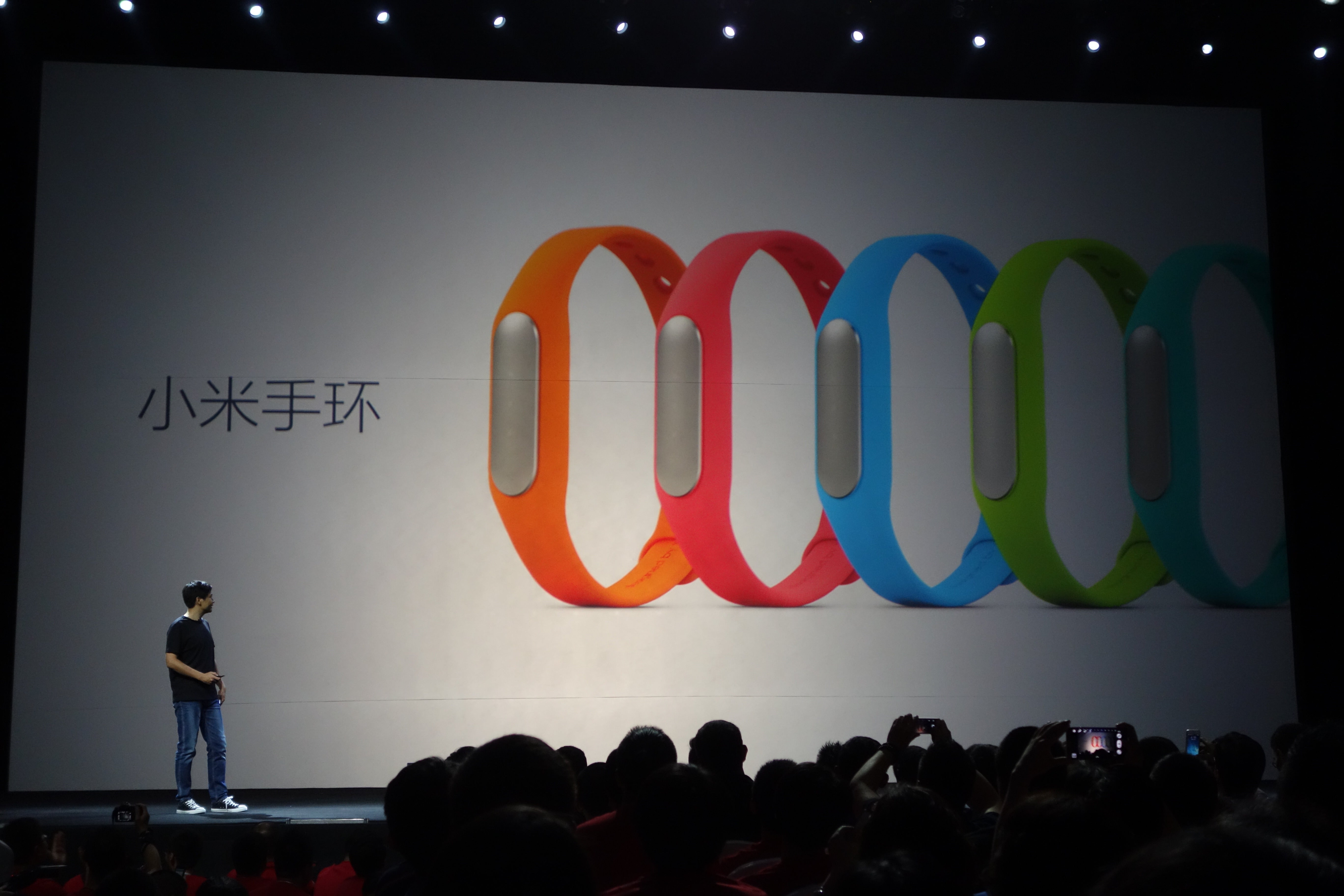
An enthusiastic tech entrepreneur dressed in jeans and a black T-shirt sober walks on stage while presenting the new products of their successful company.

The event is about to end and the executive smiles suddenly, as if suddenly remembering that you need to enter an ultimate gadget to let your audience speechless.

After a pause, he says he will reveal "one more thing". This last device surprise and Presenter clothing brand for years were almost recorded conferences performing the late Steve Jobs. But the entrepreneur smiling walking on stage in Beijing this time is not the founder of Apple.

The device is neither an iPhone nor an iPad but the MiBand, "a sophisticated water-resistant wristband" presented in July the booming Chinese company Xiaomi and serves multiple functions: monitor calories burned, recorded sleep stages and activates the functions of Smartphones produced by the company.


All for a sum in China reached only $ 13, about 7,800 Chilean pesos contrasting with the 56,000 it costs in Amazon a similar model of Nike or 207 thousand pesos will cost Apple iWatch to be launched in 2015 .

One more: between cell which operates with My Band is the E4, a sophisticated computer with Android system presented in the same event in Beijing and whose most expensive version costs in China about 200 thousand dollars, a third of the price in that Country of iPhone 6 with similar characteristics.

The mastermind behind the attractive "combo" devices high performance and low cost is Lei Jun, a businessman of 43 years who dresses and speaks as the founder of Apple and is now known as the "Steve Jobs Chinese".

As his model, Lei Jun has turned his company into a technology Xiaomi empire.According to a report released in October by IDC, in the third quarter of 2014 the company shipped 17.3 million smartphones, which put him in third place of the largest manufacturers in the world of such devices, displacing giant as Lenovo and LG.


Now only surpassed by Apple (39.3 million) and Samsung (78.1 million). Quite an achievement considering that the company was founded just four years ago in Beijing and launched its first mobile Mi1 only in 2011.

Xiaomi means "little rice", but the company is anything but humble, and runs 2,400 employeesannual revenue in excess of two billion dollars and hordes of loyal customers that focus on markets such as China and Taiwan, although already begun to look at other areas such as Latin America.

Analysts agree that the key to this rapid expansion is Lei Jun and its business strategy based on selling cell phones and high-end devices almost at cost.

Today, the entrepreneur has a fortune of 3.9 billion dollars and a cut similar to that used acolytes Jobs. For example, his followers on Sina Weibo, a Chinese version of Twitter, over four million. According to the magazine Forbes his fans are mainly young men addicted togadgets , for whom Xiaomi organizes annual conferences where a similar fervor that Apple generates live. 

Those consumers were seduced from the start by combining high performance & low price Xiaomi: to launch the Mi1 the company received 300,000 orders in the first 34 hours. In China the equipment cost less than half the iPhone 4S and in less than a year had sold over three million units.


He is an incredible self-promoter and a supreme expert inmarketing , which explains why he and his company received more attention than other presidents of companies that make similar equipment @ South China Morning Post.

Little is known about the personal life of Lei Jun, but it grew near Wuhan, a gray industrial city in central China, and studied computer. At that time he read a book about Steve Jobs and decided to emulate.

"I was very influenced and wanted to establish a company that was first class. So I created a plan to finish college quickly, "said Lei Jun at The New York Times.

After the race, he worked at several companies where their talents in engineering andmarketing allowed him to move quickly and collect as much money as the team of five engineers to found Xiaomi. 

"He has a vision. Go trends before others and is always ready to adapt, "said Liu Ren director of an investment fund to The New York Times . 

One tactic is to hire the same suppliers of other giants to ensure quality, in addition to selling through internet only to eliminate middlemen and thus lower costs. In addition,Xiaomi modified their designs and functions from feedback received online from "My Fans" and every Friday upgrade the operating system of your equipment to keep captives.


While the company achieved the milestone of one billion dollars in profits faster than any other company in China -Amazon took five years, progress has not been without criticism, which in recent times have worsened. The main thing is that phones, tablets and other devices have Xiaomi hardware designs and software suspiciously similar to those of the competition.


Hugo Barra, former vice president of Google Xiaomi hired to oversee its global operations. At a conference in California, Hugo said Xiaomi was "inspired" by the best designers in the world, including Apple, but not copied ideas.

"Show me a new product that has a completely unique design language. They will not find any. People who see a photo on a website and were accused of theft should look more closely; I invite you to experience our products first hand, "said the Brazilian executive.

"I do not see it as a compliment. When you do something for the first time do not know if it will work, you spend seven years working on something and then someone copies. It is very clear. Is theft, "said another panel when asked by Xiaomi.

What about the myth that "everything Chinese is bad"? According Metivier that has changed: "The same happened with Korean products 10 years ago. Today all the leading technology brands, whatever their country of origin, manufacture their products in China and in the same productive than Xiaomi platforms. All components of the Xiaomi phone are of the best international brands. Quality control is extremely rigorous and failure rates of products are among the lowest in the market.


Top